The Customers Page is divided into two sections:
- Filtering Options - In this section, you have multiple methods to filter through your Customers.
- Customers Tab - Here you can view all registered customers under your SynthesisVR account, including the information they have provided, their active memberships, and their SynthesisVR account balance.
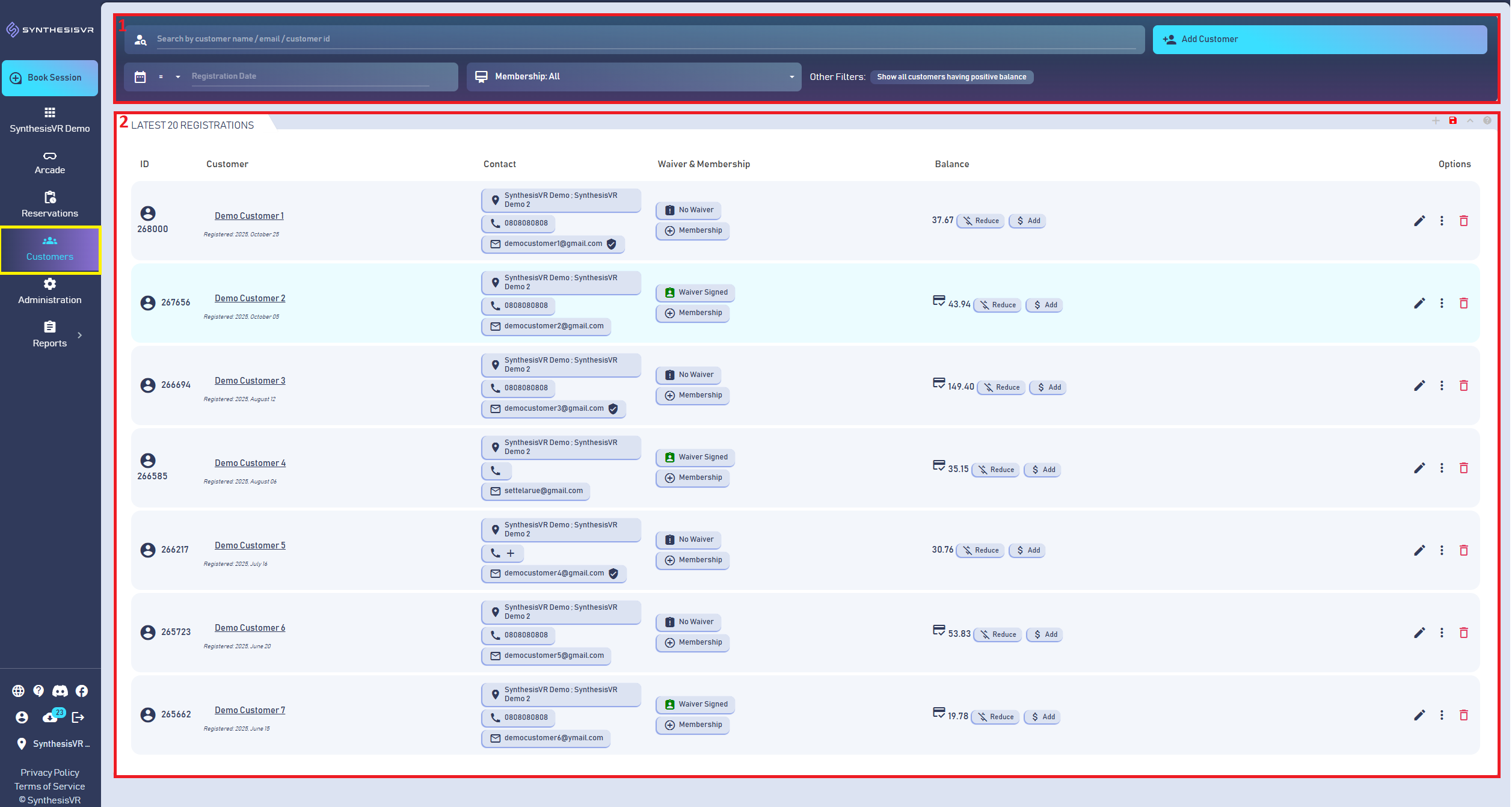

- Search - Here you can search through your Customer list using their name, email, ID, or balance amount.
- Add Customer - This option allows you to manually create a new Customer account in your SynthesisVR Web Console. You can enter their details here and use the account later when creating Reservations.
- Registration Date - This option allows you to filter your Customers based on a specific registration date or a starting date range.
- Membership - This option allows you to filter your Customer accounts by a specific active membership, if you have created and assigned memberships to your customers. Learn more about the Membership Cards here.
- Other Filters - This option allows you to filter all Customer accounts that currently have an active Membership in your SynthesisVR Web Console.
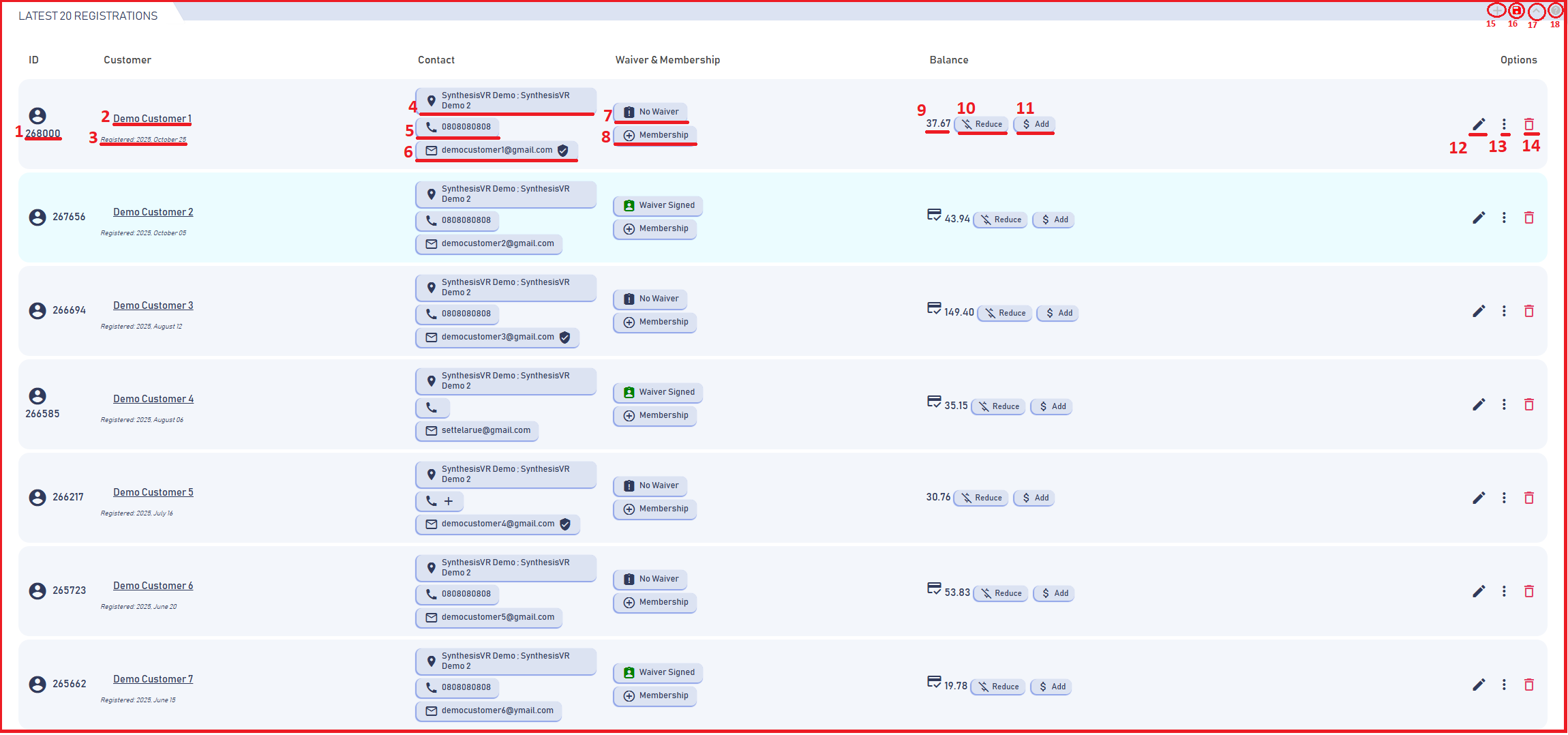
- Customer ID - Here you can view the unique ID assigned to the Customer Account.
- Customer Name - Here you can view the Name of the Customer Account.
- Registered Date - Here you can view the date when the Customer Account was created.
- SynthesisVR Account - Here you can confirm which of your SynthesisVR business accounts this Customer is registered under.
- Customer Phone Number - Here you can see the Customer’s Phone Number, if they have provided one.
- Customer Email Address - Here you can see the Customer’s email address, if they have provided one. You can also check whether the email has been verified by looking at the confirmation checkmark at the end.
- Waiver Form - Here you can see whether the Customer has signed a SynthesisVR Waiver. You can learn more about the Waiver Form here.
- Membership - Here you can see whether the Customer has an active membership on their account. Learn more about Memberships here.
- Balance Amount - Here you can see the Customer’s current account balance, which they can use as a payment method for their Reservations.
- Balance Reduce - Here you can manually reduce the Customer’s account balance if needed.
- Balance Add - Here you can manually add funds to the Customer’s account balance.
- Customer Personal Information - Here you can add or edit the personal information stored for each Customer, as shown further below. You can also create Additional Customer Information Fields, which you can learn how to set up here.
- Admin Operations - Here you have access to a set of administrative tools, such as viewing the Customer’s Reservation history, checking their balance, and adding additional information. You can review the Admin Operations section in more detail further below.
- Delete - Here you can delete the Customer account from your SynthesisVR Web Console.
- Add Customer - This option allows you to manually create a new Customer account in your SynthesisVR Web Console. You can enter their details here and use the account later when creating Reservations.
- Export to Excel - You can use this option to export your Customers information into an Excel file.
- Minimize Section - You can use this option to minimize the Customers section.
- Help Section - Provides a direct link to the dedicated article for the Customers page.
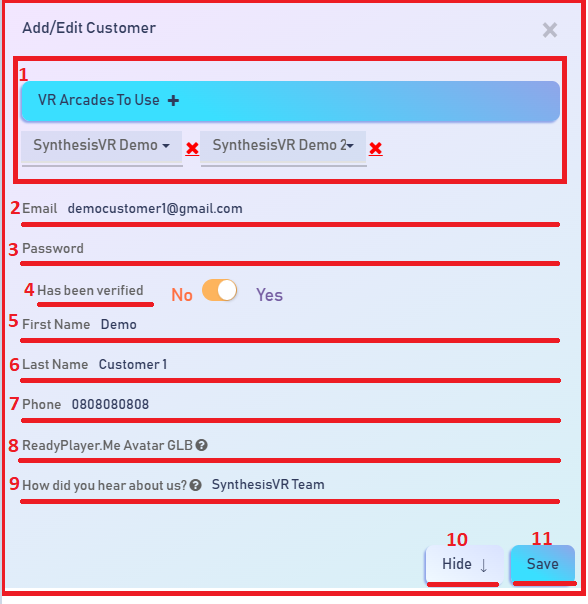
- SynthesisVR Account - Here you can confirm which of your SynthesisVR business accounts this Customer is registered under, and you can reassign the Customer to your other accounts if needed.
- Email - Here you can view the Customer’s email address. It may be collected automatically through the SynthesisVR Waiver Form or Online Booking, or you can enter it manually using this field.
- Password - Here you can store and manage the Customer’s password for their SynthesisVR account. It may be collected automatically through the SynthesisVR Waiver Form or Online Booking, or you can enter it manually using this field.
- Is Verified - Here you can confirm whether the Customer has verified their account through email. You can also manually adjust this status if needed.
- First Name - Here you can view and edit the Customer’s First Name for their SynthesisVR account. It may be collected automatically through the SynthesisVR Waiver Form or Online Booking, or you can enter it manually using this field.
- Last Name - Here you can view and edit the Customer’s Last Name for their SynthesisVR account. It may be collected automatically through the SynthesisVR Waiver Form or Online Booking, or you can enter it manually using this field.
- Phone - Here you can view and edit the Customer’s Phone Number for their SynthesisVR account. It may be collected automatically through the SynthesisVR Waiver Form or Online Booking, or you can enter it manually using this field.
- ReadyPlayerMe Avatar URL - Here you can connect the Customer’s ReadyPlayerMe avatar link, which will be used for their SynthesisVR account.
- Additional Customer Field - This is a custom field that can be added manually from your Web Console Admin Settings. It allows you to create your own information field based on the additional details you want to collect from the Customer. You can learn more about the Additional Customer Information Fields here.
- Hide - This option closes the information window without saving any changes.
- Save - This option saves the changes and then closes the window automatically.
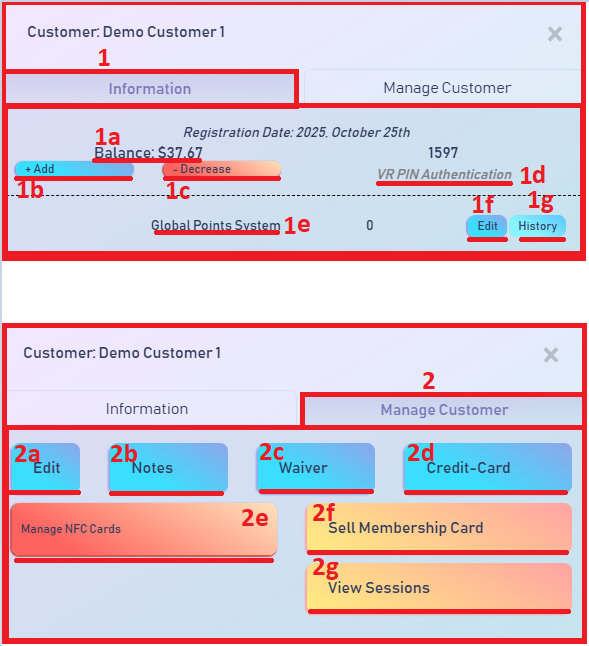
- Information - Here you can view the Customer’s account balance and manage their Reward Points System, which you can use as an alternative to real currency for Reservations. You can also add or adjust points as needed. Learn more about the Reward Points System here.
- Balance Amount - Here you can see the Customer’s current account balance, which they can use as a payment method for their Reservations.
- Add - Use this option to add balance to the Customer’s account, either as a complimentary credit or as a paid top-up.
- Decrease - Use this option to manually reduce the Customer’s account balance.
- VR Pin Authentication - This PIN can be used by the Customer if your business operates multiple VR locations. When a Session starts, the Customer will see a login screen inside the VR headset, where they can enter this PIN to access their account. This allows them to use their balance, points, and account information across all your stores, not just the one where the account was originally created.
- Reward Points System - Here you will see a list of all Reward Points System options you have created. These can be used as an alternative payment method for Reservations. This section allows you to view, manage, and adjust all available point-based options for your Customers. Learn more about the Reward Points System here.
- Edit - Here you can manually adjust the Customer’s points for each Reward Points System you have created, allowing you to add or remove points as needed.
- History - Here you can view a detailed log of when and how the Customer used their Points, including additions, deductions, and the actions that triggered those changes.
- Manage Options - Here you can view, edit, and confirm various settings related to the Customer’s account, including all active features and items associated with their SynthesisVR account.
- Customer Personal Information - From here, you can open and access the Customer Personal Information window.
- Notes - Here you can add notes to the Customer’s account.
- Waiver - Here you can check whether the customer has signed a SynthesisVR Waiver for your VR business. Learn more about the Waiver Form here.
- Credit Card - Here you can save the Customer’s credit card information (with their permission), allowing faster and more convenient payments for future purchases in your VR business.
- Manage NFC Cards - If you have an NFC reader integrated into your VR business and connected to your SynthesisVR Web Console, this option allows you to scan and manage the NFC cards of your Customer.
- Sell Membership Card - This option allows you to sell the SynthesisVR Membership Cards you’ve created in your SynthesisVR Web Console directly to your Customers. Learn more about the Membership Cards here.
- View Sessions - Here you can view the full history of Sessions this Customer has played under your SynthesisVR business.
 US
US